
Dijider journal management system

Your publishing process, in one place.

Manage submissions, reviewer invitations, revisions and publication preparation in the same system. Authors, reviewers and editors work in screens suited to their roles.

Management Panel · Journal Website · Dijider Robot · Dijider Core

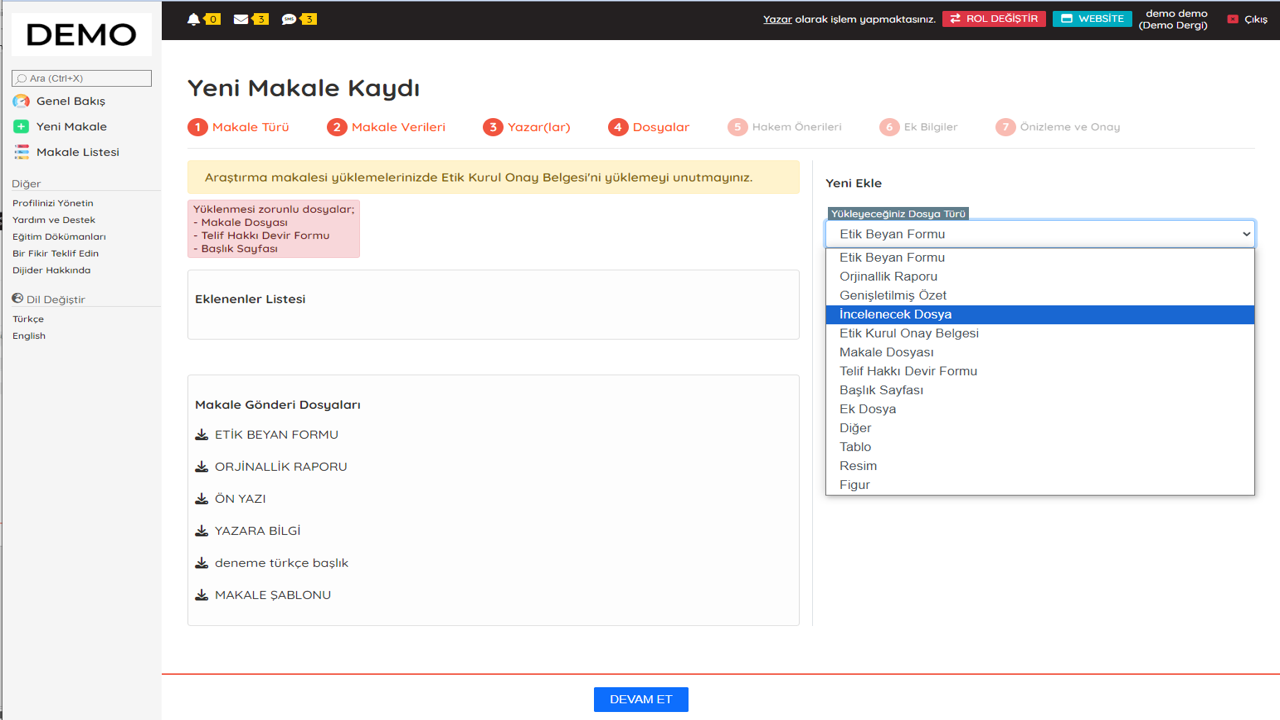
Author panel / manuscript submissionDemo screen
Dijider demo author panel showing manuscript submission steps and file types.
The file upload step in the Turkish author interface.Enlarge screen

01 / Submission & review

Follow every manuscript through its stages.

Files, assignments, reviews and decisions stay connected to the manuscript. Select a stage to see what the team can do.

Author workspace

A guided manuscript submission

The author enters article type, title, abstract, keywords, language and author details, then completes the files and final checks.

  1. Author order and manuscript metadata are collected together.
  2. Upload the manuscript, figures, tables and journal-required documents.
  3. Keep incomplete submissions as drafts and complete reviewer suggestions before sending.

Editor · technical editor · section editor

Assign the work and track responsibility

Editors inspect the submission and assign the appropriate team members. Each user sees the journals, manuscripts and actions they are authorized to access.

  1. Assign an editor, section editor or specialist to a manuscript.
  2. Cancel or transfer assignments when responsibilities change.
  3. Keep status changes and actions in the manuscript history.

Section editor · reviewer

Manage invitations and evaluations

Use the reviewer pool, keyword matches and matching scores when choosing reviewers. Follow invitation responses and evaluation deadlines in the same process.

  1. See accepted, declined and pending reviewer invitations.
  2. Use a journal-specific evaluation form and monitor overdue reviews.
  3. Record recommendations: publishable, minor revision, major revision or rejection.

Author · reviewer · editor

Keep the full revision history

Revision requests, updated files and repeat evaluations remain attached to the manuscript. The team can return to earlier rounds and see how the work changed.

  1. Distinguish minor and major revision requests.
  2. Access earlier versions and compare old and new files.
  3. Send revisions for review again and retain the editorial decision.

Editorial specialists · production team

Prepare accepted papers for an issue

Accepted papers enter the publication pool. Complete specialist checks and layout, arrange the issue, and publish it after approval.

  1. Coordinate language, copy, biostatistics and layout work.
  2. Create the volume and issue; set the cover and article order.
  3. Publish the latest issue and manage earlier issues in the archive.

Revision rounds and editorial decisions remain in the record. Requested changes can return to review before the editor makes a final decision.

02 / Editorial team

A workspace for each editorial responsibility.

Define the journal team and boards, manage profiles and assign roles. Responsibility and access follow the journal and the manuscript.

Live support within the management panel helps users when they need assistance.

Editor, technical editor and section editor

Inspect submissions, assign the responsible team members and follow editorial decisions and status changes.

Author and reviewer

Authors submit files and revisions. Reviewers respond to invitations and complete the journal’s evaluation form.

Language, copy and biostatistics editors

Assign specialist checks to the appropriate editors and keep their work connected to the manuscript record.

Layout editor and publication team

Prepare accepted manuscripts, publication files and the issue structure for final checks and approval.

03 / Journal publishing

Manage the issue and the journal’s public identity.

Publication preparation and the journal website work together. Current issues, the archive and editorial information appear under the journal’s own identity.

Publication pool and issue planning

See accepted manuscripts together, create a volume and issue, add papers and set their publication order.

Cover, publication details and approval

Prepare the cover and publication details. Complete the checks before publishing the latest issue.

Article pages and the journal archive

Present article details, full text, previous issues, author guidance, journal policies and editorial boards on the journal website.

04 / Robot & reporting

Keep pending tasks and deadlines in view.

Dijider Robot checks editorial tasks, reviewer invitations, evaluation periods and revision deadlines. It identifies delays and sends reminders according to the journal’s rules.

Reviewer certificates can be sent after completed evaluations.

Dijider RobotProcesses monitored
Reviewer invitationResponse period and invitation status
EvaluationDeadline checks and delayed tasks
Revision deliveryAutomatic reminders and notifications

Rule-based checks are recorded in the process history.

Reporting that supports editorial oversight

The overview brings article statuses, waiting assignments, drafts and recent activity together so the team can see what needs attention.

  • Articles by process stage
  • Acceptance and rejection ratios
  • Reviewer activity and performance
  • Pending and overdue work

05 / Multi-journal management

Manage your journals from one centre.

Dijider Core lets an institution configure and oversee multiple journals. Authorized users move between assigned journals and carry out their work from one management layer.

  • Independent journal settings alongside central configuration
  • Separate journal data with journal-level roles and permissions
  • Editorial operations across all journals assigned to the user
Journal AOwn publishing identity
Journal BOwn publishing identity
Journal COwn publishing identity
Journal DOwn publishing identity
DijiderCoreCentral journal management
A shared management layer; each journal retains its settings and data boundaries.

06 / Academic data outputs

Academic metadata and reusable outputs

Share publication metadata, offer citation files and produce archive outputs from published content.

OAI-PMH · Crossref · DOAJ · Copernicus
Metadata sharing and compatible data outputs for academic systems.
BibTeX · RIS
Citation exports for researchers and reference-management tools.
LOCKSS
Archive manifests supporting preservation workflows.

Plan for your institution

Let’s discuss your journal operations.

Tell us about your editorial team, journal count and publication needs so we can discuss the appropriate scope.

Apply